3.2. Creating a new language specification
Follow this quick start guide to create a new Spoofax language specification project to define your own language.
Choose Create New Project from the welcome dialog, or the File → New → Project... menu item, to open the New Project dialog.
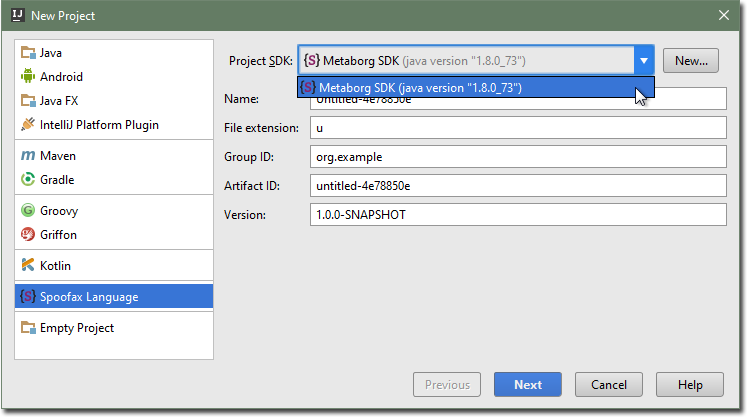
Select the Spoofax Language project type.
Select the Metaborg SDK as the project’s SDK.
Note
If the Project SDK displays <None> and you can’t select the Metaborg SDK, then you need to add it first.
Click the New... button next to the Project SDK field.

You may get a warning if you have no Java JDK configured. Click OK and configure the JDK’s home location. The suggested home directory is usually correct. Click OK.
Select a home directory for the Metaborg SDK. The default is the Spoofax plugin’s
lib/folder, which is sufficient as it contains all the core dependencies.Click OK.
Change the fields to suit your needs.
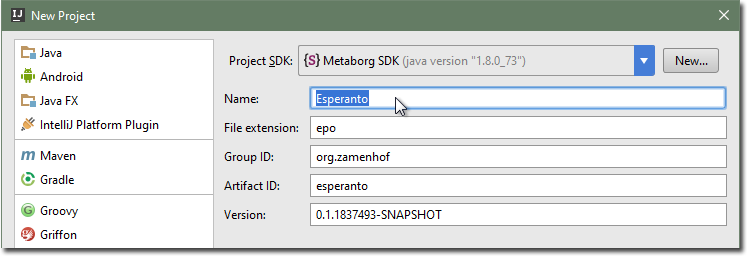
Click Next.
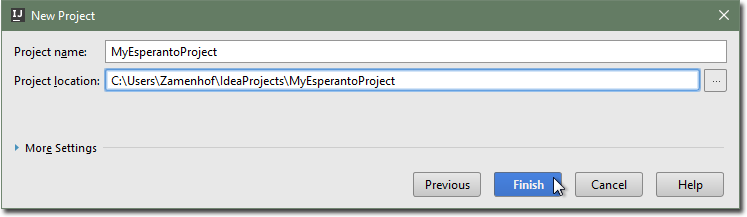
Pick a project name and location, and click Finish.
The created Spoofax language specification project will have a metaborg.yaml
file, which specifies the configuration and language dependencies of the
specification.